Talk track — OpenShift Virtualization
Rehearse from this. Present from run-sheet.md.
This is the narrative layer: what to say, why each beat is in the deck, and how to get from one to the next. Text in blockquotes is meant to be said more or less as written — not because the words are precious, but because these are the sentences that took several deliveries to get right.
Everything a live run would put on screen is embedded below, so the whole track works with no cluster.
Who is in the room
You are the pre-sales engineer. Every document in this folder is written to you.
They are a sysadmin — Linux or platform, ten years in, currently running VMware or a mixed estate, and they have automated things before. Probably with shell scripts, possibly with Ansible already, and they have been burned by an automation someone else wrote and left.
What that means for how you present:
| They do not care about | They care intensely about |
|---|---|
| How fast the VM builds | Whether it builds the same way next Tuesday |
| The product architecture diagram | Who holds the credentials |
| "Single pane of glass" | What happens the first time it fails at 2 a.m. |
| That it is automated | That it is legible — can they read it, change it, and predict it |
The single most persuasive thing you can do is admit what does not work. A sysadmin has sat through demos where the hard parts were skipped. Volunteering the single-node limitation buys you more credibility than any feature. Beat 7 exists for exactly this reason — do not cut it for time.
The Windows gap that used to sit beside it has closed (#340), so beat 7 is one admission shorter than it was. Do not keep saying it: an admitted limitation that turns out to be stale costs you the credibility the admission was supposed to buy.
Do not oversell the speed. "Nine minutes" is a fact and it is fine. "Minutes instead of weeks" sounds like a slide and invites them to start arguing with the number instead of listening.
Beat 1 · Cold open on the destination (0–3)
Open on the finished page. Say nothing about how it got there.
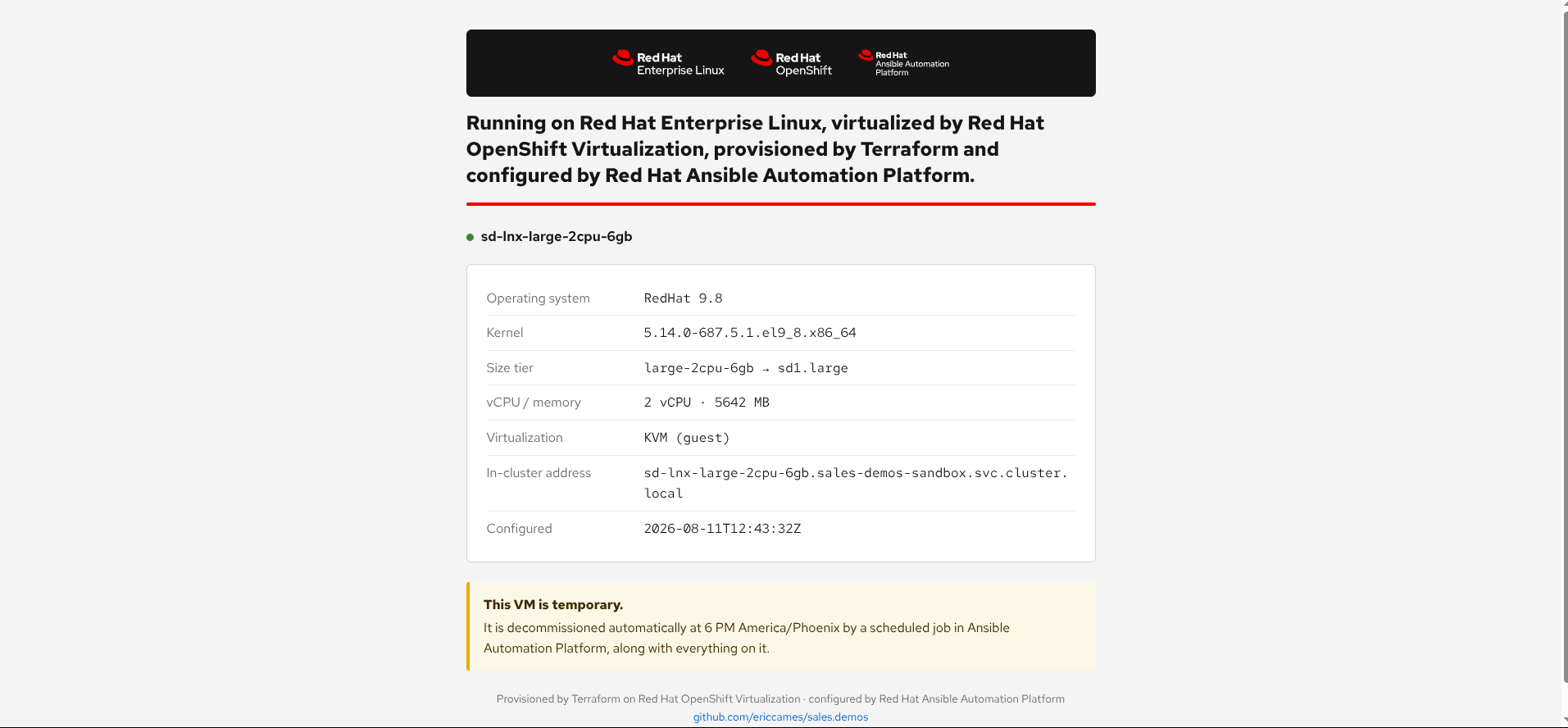
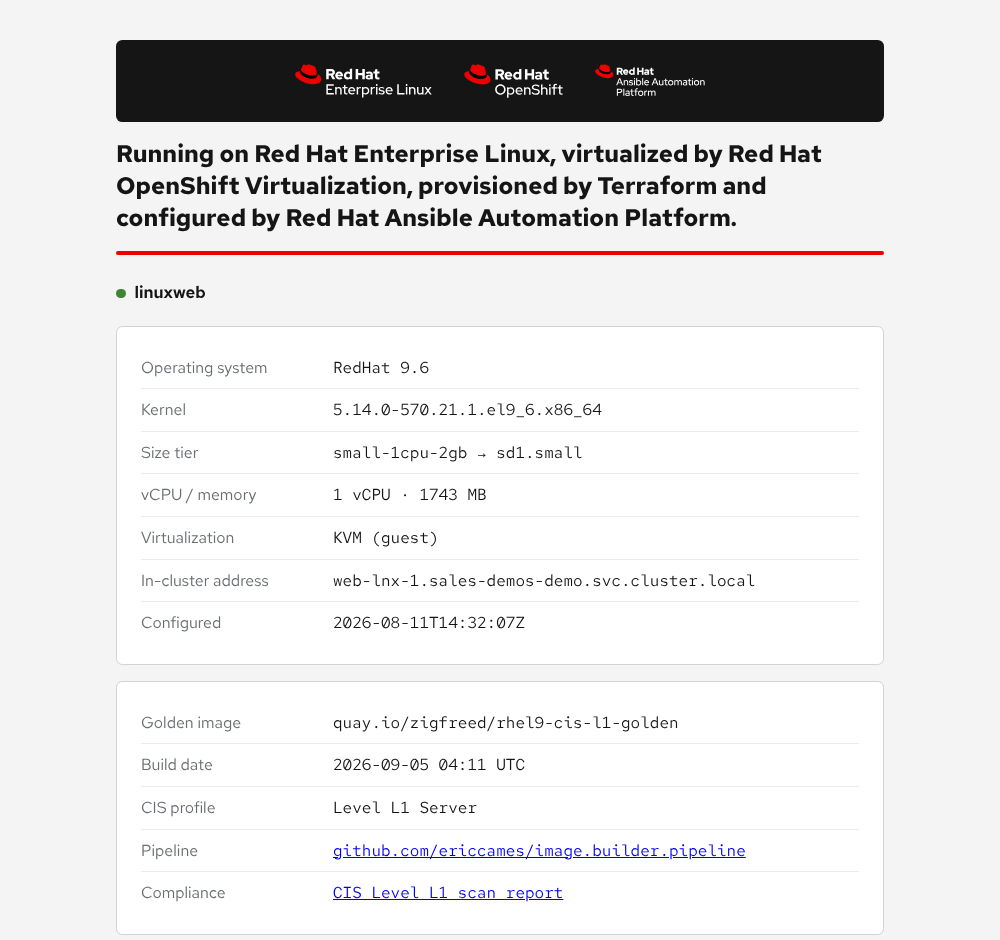
A genuine capture — this page was served by a running VM over the Route. There is also a rendered copy, produced from the same template by
utilities/render-demo-assets.py, which is what keeps this talk track working when no cluster is available. Use the live one when you have it.
Point at three things:
"That's a RHEL 9 guest. Somebody asked for 'large' — that's the size tier line, and it resolved to a cluster instance type called
sd1.large, two CPUs and six gigs. And it deletes itself at 6 o'clock.""This machine did not exist nine minutes before that page was taken. Nobody opened a hypervisor console. Nobody allocated an IP. Nobody logged into it — not once, not even to install the web server. Let me show you what did happen."
Why open here. Two reasons. It sets the destination so every step afterwards has somewhere to land, and it puts a concrete artifact on screen before you have made a single claim. A sysadmin's default posture is "show me" — get there inside the first sixty seconds.
Transition: "But the demo isn't the machine. Let me start where you start."
Beat 2 · The problem, in their words (3–6)
Screen off. Ask:
"Walk me through what happens today when a developer asks you for a VM."
Then stop talking. Genuinely stop — count to five if you have to. Whatever they describe is your outline for the next twenty minutes, and every later beat lands harder if you can attach it to something they said.
Listen for:
- The hand-offs. Networking allocates the IP, storage carves the LUN, security signs off. Each one is a queue.
- Who patches it, and when. Usually "eventually", usually a different team.
- Who deletes it. Nobody volunteers this. Ask directly if they do not raise it: "and what happens to it when the project's over?" The pause you get is the pause you will come back to at Beat 6.
Reflect it back in their words, then:
"Every one of those steps is a judgment call somebody makes. That's why no two of your machines are quite the same — not because anyone was careless, but because the judgment happened fresh each time. What I'm going to show you isn't 'we made VMs faster'. It's that the judgment calls got written down once, and now they run the same way every time."
Why this beat exists. If you go straight from the screenshot to the automation, you are demoing a feature. If you go through their process first, you are demoing an answer. It is the same content either way — the ordering is what makes it land.
Transition: "So here's the whole thing a requester sees."
Beat 3 · The interface is one question (6–8)
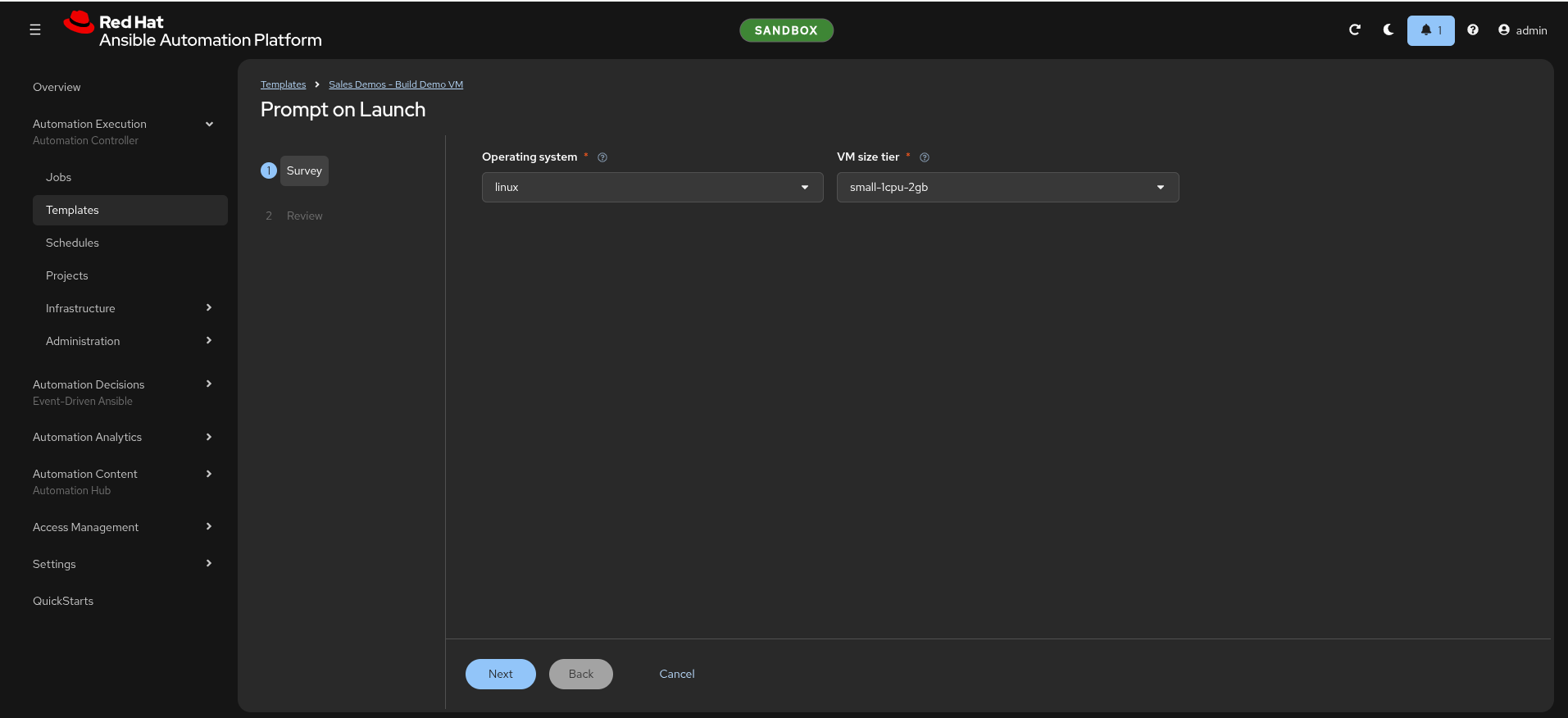
| Question | Variable | Choices | Default |
|---|---|---|---|
| VM size tier | vm_size_tier |
small · medium · large |
small |
"That's it. A t-shirt size. No IP address, no storage class, no hostname — because none of those are decisions the person asking for the machine should be making."
This used to be two questions, and the OS dropdown was removed on purpose (#300, #301). Worth a sentence if anyone asks where the operating system is chosen, because the answer is a good one:
"It's which workflow you launch — there's a Linux one and a Windows one, and each owns its own Terraform state. When it was a dropdown, picking Windows planned the running Linux VM for destruction. The fix wasn't a warning label; it was making the two unable to see each other."
Then the missing dropdown. This is the beat that earns their attention:
"Notice what isn't there. There's no dropdown for which environment to build in. That's deliberate. A dropdown for the target environment is exactly one mis-click away from provisioning into the cluster you show customers. So it isn't a dropdown — each controller's template is pointed at itself, and the playbook fails closed if the two ever disagree."
Why this beat exists. Any vendor can show you a form. Showing them a decision about what to leave off the form tells them the thing was built by someone who has been on call. Watch their face here — this is usually where a skeptical sysadmin starts actually listening.
Transition: "Two questions on the front. Here's what's behind them."
Beat 4 · Behind the button (8–16)
Start from empty. Show the namespace with nothing in it — this is the "before" that makes everything after it mean something:
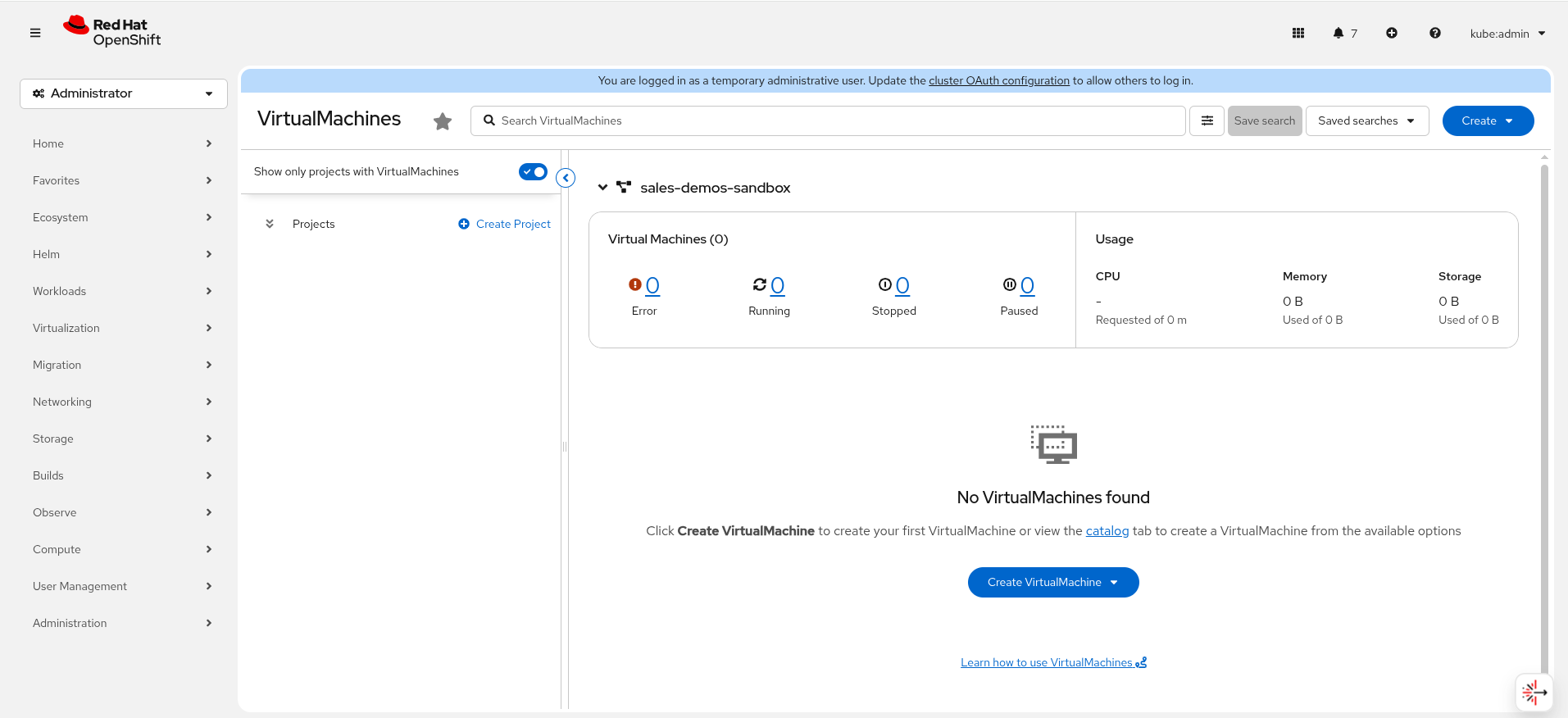
"That's the project the VM is going to land in. Nothing in it. Watch."
Then the workflow, mid-run:
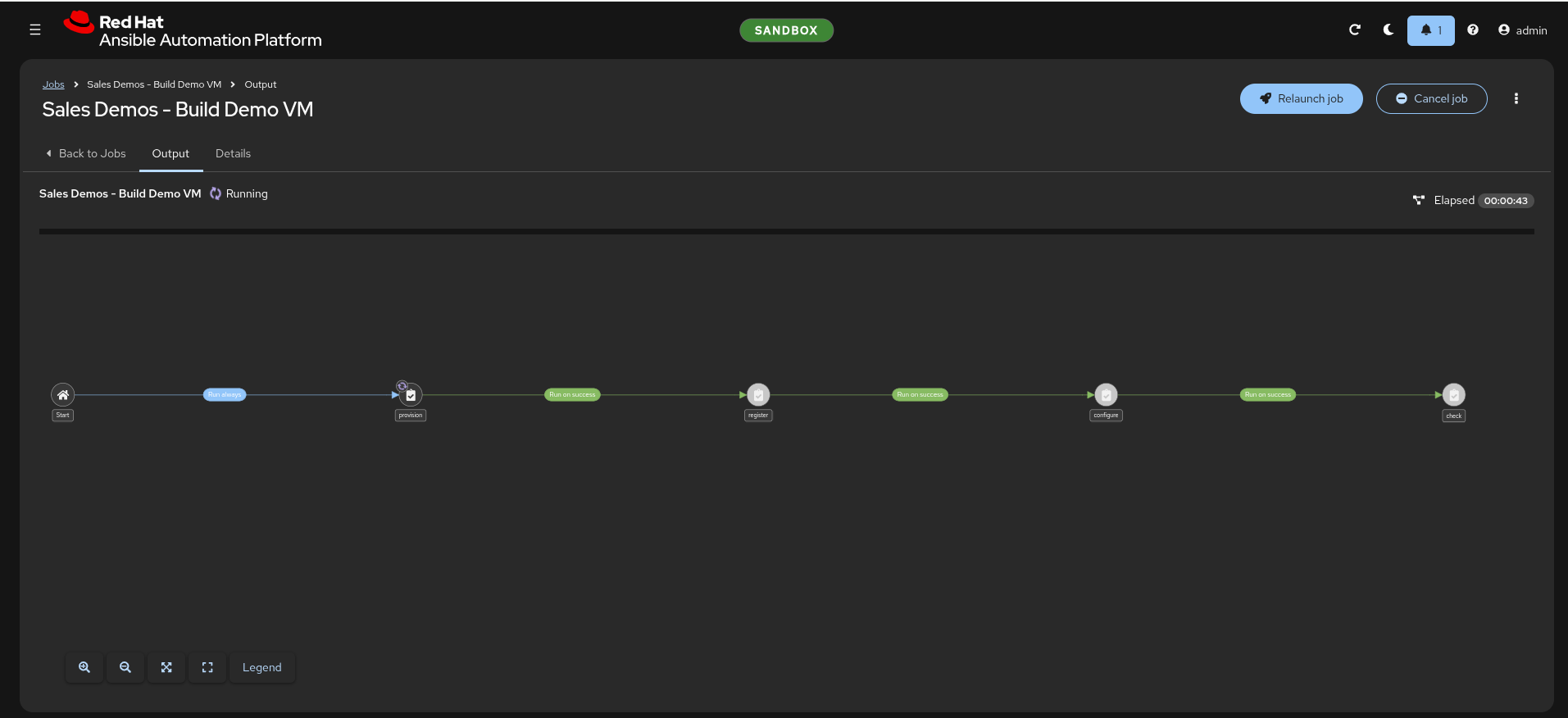
Five nodes, chained left to right, each one gated on the previous succeeding. Name them, then slow down for three specific points. Resist the urge to narrate every task — you are teaching three ideas, not reading a playbook.
Screenshot is stale — captured before the compliance node (#202) and the
300 rename, so the image shows four nodes titled
Sales Demos - Build Demo VM. Retake it from a run ofLinux Day 1 - 0 Workflow.
4a · The Route returns 503, and that is correct
Open the URL now, in front of them. This is what you get:
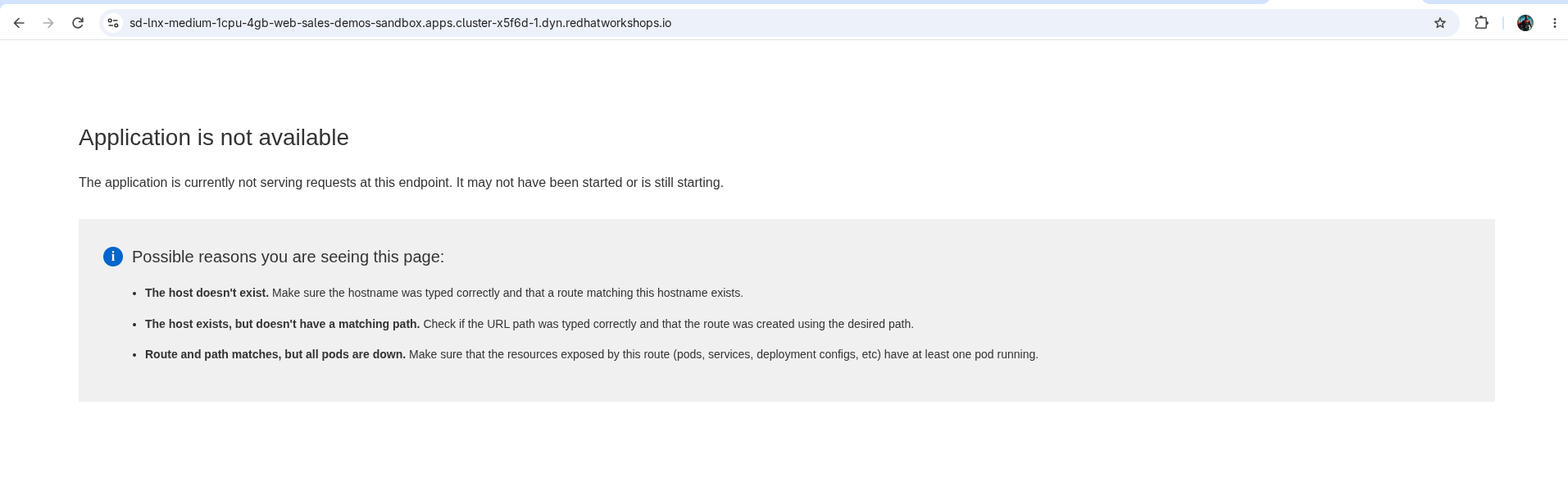
"The moment Terraform finishes, that URL exists — the hostname resolves, the route is live, TLS terminates. And there's nothing behind it, because nobody's installed a web server yet."
"That's not a bug I'm apologizing for, it's the design. Building the box and configuring the box are two different jobs with two different failure modes, and keeping them visibly separate means that when something breaks you already know which half broke."
Say the URL out loud while it is on screen — it encodes the whole story:
web-lnx-1 is the VM — its workload role, its OS, and which member of the farm
it is; -web is the Service backing the route; sales-demos-sandbox is the
namespace. The tier is deliberately absent: it is how big the machine is, not
what it is for, and it lives in the host variables instead (#389).
$ for u in $(terraform output -json web_urls | jq -r '.[]'); do curl -sI "$u" | head -1; done
HTTP/1.1 503 Service Unavailable     # after provision
HTTP/1.1 200 OK                      # after configure
Then come back to it after the configure node and reload. The 503 → 200 transition, live, is the single best proof in the demo — nothing else you show makes the separation of concerns as concrete.
Why: it reframes an apparent flaw as an architectural choice — and it is genuinely true, which is why it survives follow-up questions.
4b · The ordering you would not guess
"Register runs before configure. Not for tidiness. The RHEL 9 boot image that OpenShift Virtualization ships with has no package repositories on it at all — none. So every
dnftask fails on an unregistered guest, with an error that doesn't obviously say 'you forgot to register'.""That's a debugging session the first time. It's also the entire reason this is one workflow instead of three buttons that somebody launches in the wrong order at nine in the morning with a customer watching."
Why: this is the most quietly convincing thing in the demo. It says the automation encodes experience, not just steps — and every sysadmin in the room has their own version of this story.
4c · Three different definitions of "done"
| "Done" means | Elapsed |
|---|---|
terraform apply returns |
~10 seconds |
| The provision job goes green | 36 seconds |
The VM reports Running |
~45 seconds |
| sshd actually accepts a connection | about a minute after that |
"Four different answers to 'is it ready yet'. And look at the second one — the provision job reports Success at thirty-six seconds, while the machine is still booting. A green checkmark is not the same as a usable server."
"A person learns that by getting Connection refused twice and assuming they broke something. The workflow just waits — and the wait is written into the playbook rather than into the workflow, so it protects you when you run it by hand too."
This is the beat where the job-timings screenshot pays off twice: the provision node's 36 seconds is visible right there, and so is the fact that register took four and a half minutes partly because it spent the first stretch waiting for a machine the previous job had already called done.
Why: it is a detail nobody fakes. It signals the thing has actually been run enough times to find the sharp edges.
And the same namespace, after
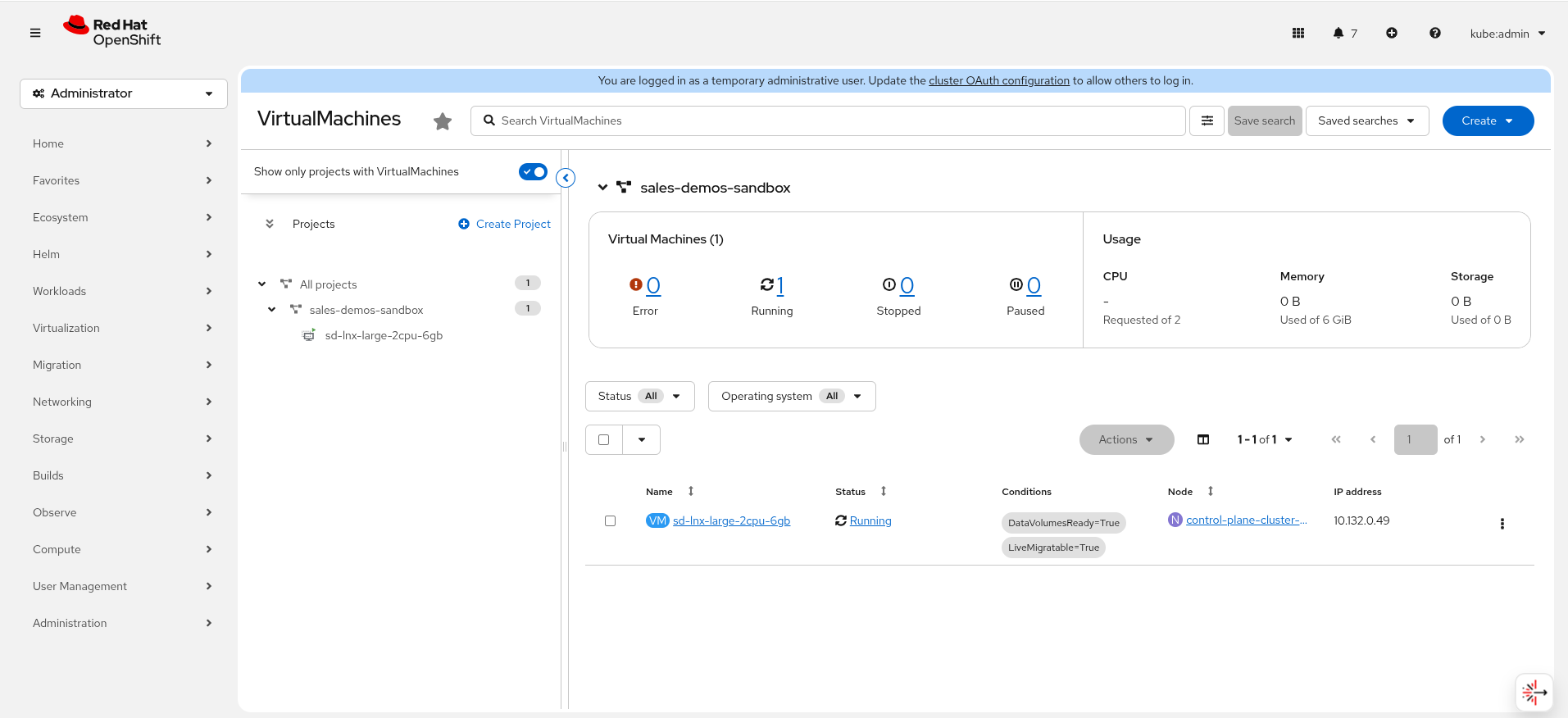
A
largerun, captured when that tier was still spelledlarge-2cpu-6gbon screen, so the name differs from the survey shot above — they are two different launches, not one continuous sequence. That spelling is now a retained alias and no longer describes the shape:largeis 4 vCPU and 16 GiB (#348)."Same view, one VM, running. Requested 2 CPU, using 6 gigs — which is exactly the tier that was asked for. Nobody touched the console to make that happen."
Watch for LiveMigratable=True in that Conditions column. A sharp sysadmin
will spot it and ask why you said there was no live migration. The answer is
precise and worth having ready:
"Good catch — that condition means the VM is eligible to migrate: its storage is shared, it has no local-only devices. It's a property of how the machine was built. What it doesn't have is anywhere to go, because this cluster is one node. Give it a second node and that condition becomes useful."
Close the beat with the real numbers
You have them, from an actual run, so use them rather than rounding:
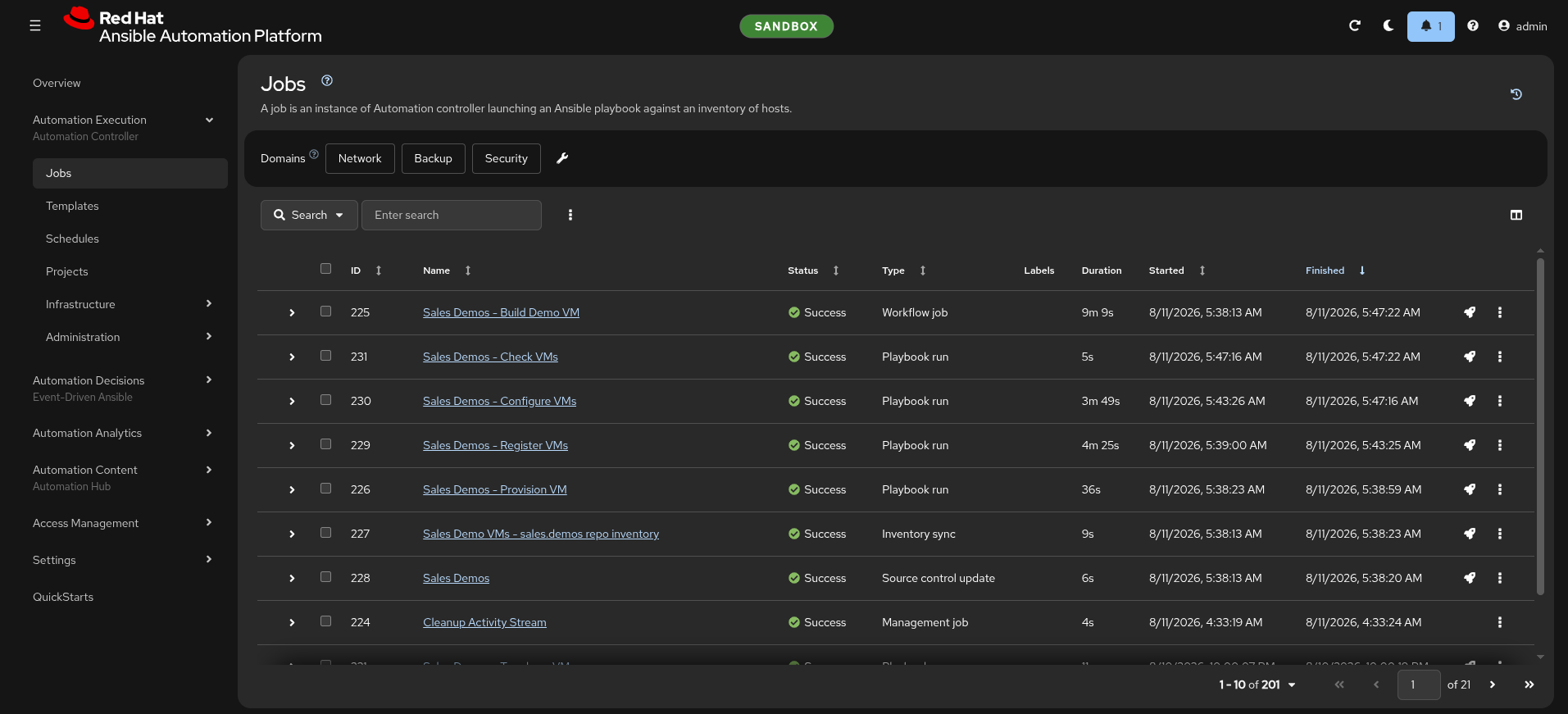
| Node | Duration |
|---|---|
| Provision VM | 36 s |
| Register Linux VMs | 4 m 25 s |
| Configure Linux VMs | 3 m 49 s |
| Check Linux VMs | 5 s |
| Whole workflow | 9 m 9 s |
"Nine minutes and nine seconds, and look where it goes. Building the machine is thirty-six seconds. Ninety percent of the run is registering to the CDN and then pulling packages and patches over it — which is exactly the part you'd be waiting on anyway if you did this by hand."
This table is worth putting on screen. A sysadmin trusts a job list with durations in it far more than a presenter saying "about nine minutes", and it pre-empts the suspicion that the fast part is the only part you showed.
Transition: "So nine minutes later, here's what you've actually got."
Beat 5 · What you get (16–22)
Back to the screenshot. The point to land is that nothing on that page is hardcoded — every value came from the machine describing itself.
"Operating system, kernel, CPU, memory — all gathered from the guest. The size tier line shows what they asked for and what it resolved to. And the in-cluster address is how AAP reached the machine: plain ssh on port 22, no bastion, no jump host, no agent installed. The platform gave it a stable DNS name and that was enough."
facts.json
For the person who asks where the page gets its data — and someone always does:
{
    "hostname": "linuxweb",
    "gathered": "2026-08-11T14:32:07Z",
    "os": {
        "distribution": "RedHat",
        "version": "9.6",
        "kernel": "5.14.0-570.21.1.el9_6.x86_64"
    },
    "resources": {
        "vcpus": 1,
        "memory_mb": 1743
    },
    "virtualization": {
        "type": "KVM",
        "role": "guest"
    },
    "provisioning": {
        "vm_size_tier": "small-1cpu-2gb",
        "instance_type": "sd1.small",
        "in_cluster_address": "web-lnx-1.sales-demos-demo.svc.cluster.local",
        "repository": "https://github.com/ericcames/sales.demos"
    },
    "golden_image": {
        "source": "quay.io/zigfreed/rhel9-cis-l1-golden:20260905-0411",
        "repo": "quay.io/zigfreed/rhel9-cis-l1-golden",
        "build_date": "2026-09-05 04:11 UTC",
        "cis_level": "L1",
        "pipeline": "https://github.com/ericcames/image.builder.pipeline"
    }
}
"Same data, curl-able, at
/facts.json. And the same facts are cached in AAP's database, so they're on the host page in the controller too. One gather, two places to read it."
The two banners, and why there are two
This is a better beat than it looks. Show them in order.
Before you authenticate — /etc/issue.net, served over ssh by a drop-in
config that is validated with sshd -t and applied with a reload, never a
restart:
###############################################################################
#                                                                             #
#                           AUTHORIZED ACCESS ONLY                            #
#                                                                             #
#  This system is the property of Red Hat, Inc.                               #
#  and is provided for demonstration and evaluation purposes. Access is       #
#  permitted only to authorized users, for authorized purposes.               #
#                                                                             #
#  By continuing past this notice you acknowledge that:                       #
#                                                                             #
#    * Your use of this system may be monitored, recorded and audited.        #
#    * You have no expectation of privacy in your use of this system.         #
#    * Unauthorized access or use may result in disciplinary action and       #
#      civil or criminal penalties under applicable law.                      #
#                                                                             #
#  If you are not an authorized user, disconnect now.                         #
#                                                                             #
###############################################################################
"No branding, no product names, no demo URL. That's shown to anyone who can open port 22, before they've proved who they are, so it says nothing except the warning."
After you authenticate — /etc/motd:
        ___________________________________________________________________
       /                                                                   \
      |    ____  _____ ____    _   _    _  _____                            |
      |   |  _ \| ____|  _ \  | | | |  / \|_   _|                           |
      |   | |_) |  _| | | | | | |_| | / _ \ | |                             |
      |   |  _ <| |___| |_| | |  _  |/ ___ \| |                             |
      |   |_| \_\_____|____/  |_| |_/_/   \_\_|                             |
      |                                                                     |
      |   ___   ____   _____  _   _  ____   _   _  ___  _____  _____        |
      |  / _ \ |  _ \ | ____|| \ | |/ ___| | | | ||_ _||  ___||_   _|       |
      | | | | || |_) ||  _|  |  \| |\___ \ | |_| | | | | |_     | |         |
      | | |_| ||  __/ | |___ | |\  | ___) ||  _  | | | |  _|    | |         |
      |  \___/ |_|    |_____||_| \_||____/ |_| |_||___||_|      |_|         |
      |                                                                     |
      |         =============================================               |
      |          V I R T U A L I Z A T I O N   D E M O                      |
      |         =============================================               |
      |                                                                     |
      |   Powered by:                                                       |
      |     - OpenShift Virtualization    (host)                            |
      |     - Terraform                   (provision)                       |
      |     - Ansible Automation Platform (configure/patch)                 |
      |     - Red Hat Insights            (detect)                          |
      |                                                                     |
      |   This host is managed by AAP. Manual changes may be reverted.      |
       \___________________________________________________________________/
              \
               \   ^__^
                \  (oo)\_______
                   (__)\       )\/\
                       ||----w |
                       ||     ||

   Demo page:  https://web-lnx-1-web-sales-demos-demo.apps.cluster-abcde.dyn.redhatworkshops.io
   Console:    https://web-lnx-1-cockpit-sales-demos-demo.apps.cluster-abcde.dyn.redhatworkshops.io
   Compliance: https://web-lnx-1-web-sales-demos-demo.apps.cluster-abcde.dyn.redhatworkshops.io/compliance/report.html
Let them enjoy the cow — a laugh here is worth having. Then take it somewhere:
"'This host is managed by AAP. Manual changes may be reverted.' That one line is the whole operating model, printed exactly where somebody who's about to do something manual will read it. Not in a wiki. On the box."
Why this beat exists. The banners are the only part of the demo that speaks to the human who inherits the machine. Sysadmins notice that. It also quietly demonstrates that the automation touched sshd carefully — validated, reloaded, not restarted — which is the kind of detail that decides whether they trust it near production.
Cockpit
"Cockpit's installed and the firewall's open for it on every guest. Because when somebody asks 'what if I just need to look at the box', the answer should be yes."
Transition: "Now — none of that is the interesting part."
Beat 6 · Why a sysadmin should care (22–26)
Four points. Do not tour the repository; land these.
1. It converges, it doesn't just run.
"Run the platform install again and it reports zero changes. That matters more than it sounds — it means this is a converger, not a script that assumes it's going first. You can run it against a half-built environment and it'll finish the job instead of falling over."
2. The guardrails are in code, not in a wiki.
"Ask for more memory than the node has, and the Terraform plan fails. It does not build you a VM that sits in Pending forever while the automation reports success. The budget is a precondition in the module — the failure happens at plan time, in the place where you can still do something about it."
This is the one to lean on if they have been burned before. Everyone has a story about automation that reported success and did nothing.
3. One implementation, two front doors.
"Everything I've shown you runs from a job template in the platform, and the exact same playbook runs from a laptop. Not a reimplementation — the same file. The survey variable names, the command-line variables, and the Terraform variables are literally the same strings. That's the contract: if you can run it one way, you can run it the other, and they cannot drift."
Why they care: it is the difference between automation they can debug and automation they have to file a ticket about.
4. It cleans up after itself.
Come back to the pause from Beat 2 — who deletes it?
"You mentioned nobody really owns deleting these. Teardown here is a scheduled job — six o'clock, every night. And it's deliberately selective: it destroys the VMs but preserves the expensive things, the virtualization layer and the boot images and the state, because rebuilding those is forty-five minutes you don't want to spend. Cost control is a schedule, not a monthly reminder to go look at what's still running."
Transition: "Before questions, let me tell you what this doesn't do."
Beat 7 · The honest bits (26–28)
Do not cut this beat. It is the highest-value ninety seconds in the session.
"Three things I'd rather you hear from me."
"One — there's no live migration in what I showed you. That lab cluster is a single node. OpenShift Virtualization does live migration; this environment physically can't demonstrate it. I'd rather say that than put up a slide about it."
"Two — one of the config jobs always reports 'changed' even when nothing changed, because the platform returns one setting as encrypted on every read so Ansible can never see it as settled. Cosmetic, known, written down."
This beat used to have a third admission and no longer does. It said Windows was wired up and would not boot — true until #340, and now stale. Delete it from your delivery rather than softening it.
⛔ Do not substitute the compliance percentage here
The Windows compliance number is available as a third item again: measured 2026-09-08, a clone scores 26 of 27 (96%), which really is a demonstration that the hardening took and is still in place after
sysprep /generalize. It was withdrawn while #358 was open and the guest scored 33%; that is fixed.
That is a better third item anyway: a limitation you are choosing to disclose about something that works lands harder than one about something that does not.
Why this works. You are not confessing weaknesses; you are demonstrating that the documentation is honest, which is the actual claim you want them to believe. If the known issues are written down in public, the working parts are probably real too.
Transition: "Which brings me to the last thing."
Beat 8 · Close (28–30)
Point at the footer of the demo page.
"That link is on the page the demo just built. All of it — the Terraform, the playbooks, the workflow definition, the survey, and the design notes for why it's built this way instead of some other way — is in that repository, in public, right now. Nothing I showed you is behind a login, and the known problems are in the issue tracker next to the working parts."
Then one question. Ask it and stop:
- "What's the first thing in your estate you'd point this at?"
- "Who else needs to be in the room the second time we do this?"
- "Would it be more useful to see this run live against your requirements?"
Do not offer all three. Pick the one that fits what you heard in Beat 2.
If you only get ten minutes
It happens. Keep Beats 1, 4b, 6.4 and 8 — the destination, the ordering nobody guesses, teardown on a schedule, and the public repo. Drop everything else. That is still a complete argument.
Where the words come from
Every claim in this track is checkable in the repo. If you get pushed on one:
| Claim | Source |
|---|---|
| The survey is one question, no environment or OS dropdown | inventory/group_vars/aap/controller_workflows.yml:178-193, controller_templates.yml |
| Register must precede configure; the image has no repos | controller_workflows.yml:10-14, playbooks/roles/linux_register/tasks/main.yml |
| 10 s / 45 s / +1 min | README.md, playbooks/register_linux_vm.yml |
| 36 s / 4 m 25 s / 3 m 49 s / 5 s, 9 m 9 s total | docs/images/aap-job-timings.png — one measured run |
| Memory budget fails at plan time | terraform/ocpvirt/locals.tf |
| Nightly teardown, preserving CNV and boot sources | inventory/group_vars/<env>/controller_schedules.yml, playbooks/teardown.yml |
| Single node, no live migration | docs/plan/ocpvirt-demo-plan.md → Constraints |
| The page and banners shown above | playbooks/roles/linux_configure/templates/ |
| Windows has the same five-step chain | inventory/group_vars/aap/controller_workflows.yml → Windows Day 1 - 0 Workflow |
| Step 2 is Patch on Windows, Register on Linux | playbooks/patch_windows_vm.yml header, playbooks/roles/windows_patching/tasks/main.yml |
| Windows compliance verifies rather than scans | playbooks/roles/windows_compliance/tasks/main.yml, and the published report.html title |
| Sixteen documented exceptions, each with an owner | playbooks/roles/windows_compliance/defaults/main.yml → windows_compliance_exceptions |
| Fifteen are the image factory's | image.builder.pipeline/playbooks/vars/cis_profile.yml, plus win_skip_for_test in the vendored Windows-2022-CIS role's defaults/main.yml |
| The sixteenth is ours — a UAC setting put back | terraform/ocpvirt/main.tf, sysprep unattend FirstLogonCommands order 2 |
| The percentage is over checked controls, not the benchmark | playbooks/roles/windows_compliance/templates/report.html.j2, and summary.json's controls_checked |
| Windows page: two logos, no Microsoft mark | playbooks/roles/windows_configure/files/logos/SOURCE.md |
| Windows was blocked on the golden image, and no longer is | sales.demos/ROADMAP.md, project history, sales.demos issues #3, #234, #257, #340 |
| Windows takes ~15 min cold, Linux ~9 min | docs/plan/ocpvirt-demo-plan.md → Windows demo performance budget (workflow job 433) |
| ~6m 30s of it is sysprep first boot, and cannot be shortened | same, Finding 2 — 26.7s against an already-booted guest |
| A Windows clone reaches Running in ~36 seconds | same, and #340's verification notes |
| Repair against an existing guest is ~7 min | same, projected from the per-node measurements |